
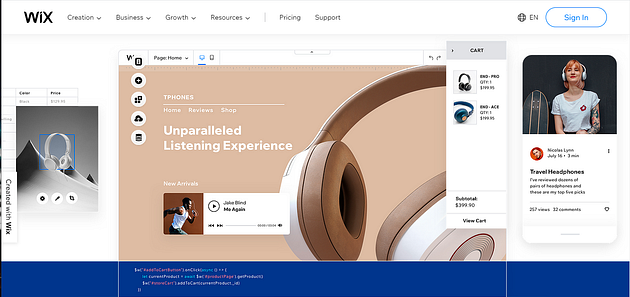
First of all, lets have a look at what the front page of this landing site builder called “Wix” looks like so that you will be sure you are on the right page.

When you scroll down a bit, this is what you will see :

In this review I am going to give you a breakdown of what Wix is,
What Is Wix?
Wix is a website building tool that allows people without the knowledge of coding skills to create their own website, landing page or online store.
Wix is a ‘hosted’ solution, and this means that it runs in the cloud on its own servers. So, there’s no software for you to install anywhere, and you don’t have to buy any hosting from anywhere — so as long as you have a web browser and access to the internet, you can build a Wix website instantly.
Wix is a platform aimed at serving small businesses or solo entrepreneur rather than big enterprises.
Wix is one of the more established website builder companies out there today in 2021 — it was founded way back in 2006 all the way in Israel and it now has over 5,000 employees working for them in the company. Wix has a very large userbase: according to Builtwith, there are around over 4.6 million live websites using Wix today.
When you compare other companies, you can have a better understanding of the scope of Wix. A company like Squarespace has about 1,100 employees, and the company hosts 2.6 million websites. Jimdo has 200 employees and hosts 500,000 websites: according to Builtwith.
The large size of Wix is important because it gives long-term security. It basically reduces the risk of the organization folding, taking your website with it, and this means you can look forward to regular feature updates.
The Functionality Of Wix
Wix allows users to create websites using a simple drag-and-drop user interface which makes it easy for users to navigate the website comfortably.
A Wix website can be used for:
- Blogging
- Hosting an online forum
- Building an online store
- Appointment booking
- Collecting contact details
Wix Rating
Wix scored 4.7 stars out of 5 overall, which is very impressive, making it the best website builder my research team have tested so far. The areas we tested Wix on include:
- Design Flexibility
- Ease of Use
- Features
- Help and support
- Ecommerce
- Value for money
- Customer Score

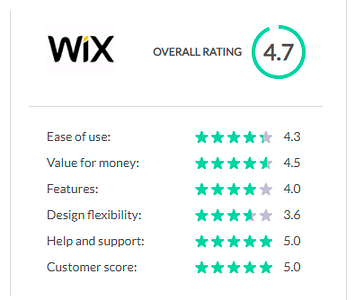
We were also able to get reviews people who have used Wix to build websites for their organizations and online business and to be frank Wix also scored a very high rating from their personal experiences, which goes to show that Wix gives high customer satisfaction.
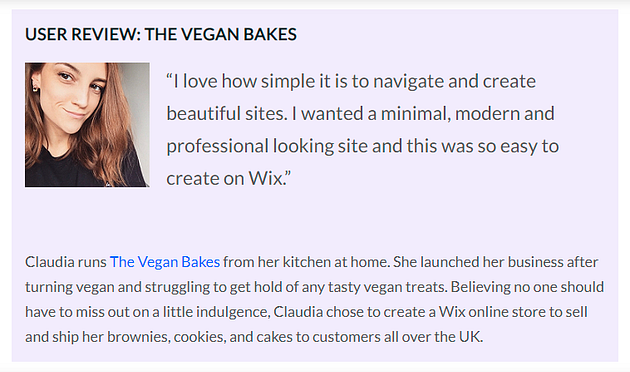
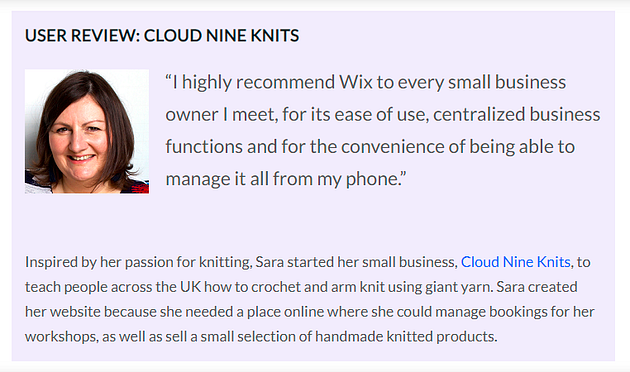
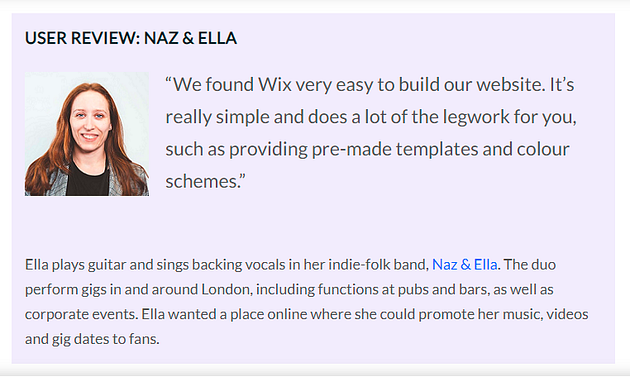
Here are some customer feedbacks :



Wix Free Package
The free version of Wix available allows you to create a simple site.
This is a good way to try out the platform, but there are few key things you will be missing out on with this package.
For instance, with the free Wix package, you wont be able to connect a domain name to your website. Also, there are going to be noticeable ads that will pop up. It does not facilitate e-commerce.
If you need a simple website to accompany a wedding, birthday party or small community garage sale, the free package is totally fine for you — however, due to the lack of key features, it’s not really the best option for professional users.
On the good side though, the Wix free package allows for users to use all 800+ of the Wix templates, and includes hosting.
You can make use of the beautiful images, icons and clip arts that Wix provides. Users can also add apps from the Wix app market (which provides both paid and free apps), along side 500MB of storage and 500MB bandwidth. So there are still great benefits users get to enjoy by using the free Wix package without needing to provide any credit card details..
This should be fine for a simple website with low traffic.
CLICK HERE to access the Wix free package.
Wix Pricing
The options available for the paid packages in Wix depend on the country of your residence— this Wix review is going to look at the Wix pricing plans in the US.
Wix offers a two-week-money-back guarantee for its paid packages.
(If you live in another country, you are likely to encounter a similar set of plans, but occasionally with slightly different names and costs.)

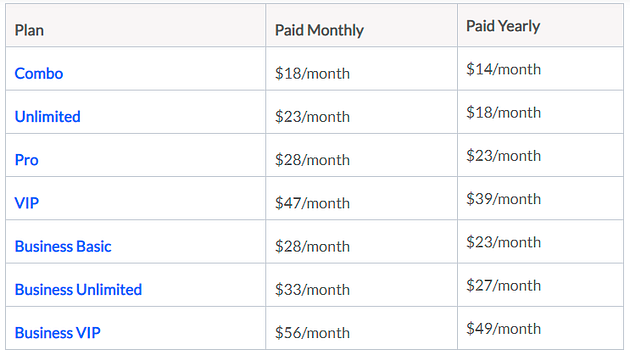
Combo
The ‘Combo’ plan is specifically for personal use.
Most importantly, it removes Wix brand advertising from your website.
It also allows you to connect a domain name to your website, and provides free domain name registration for the first year after purchase.
You also get 3GB storage for your content, and you can also upload 30 minutes of video content.
Unlimited
The difference between the Unlimited plan and the ‘Combo’ plan is that it gives you $300 worth of ‘Ad Vouchers’. These can be used to pay for advertising with Google Adwords, Bing Ads, and Local Listing which is key.
This Unlimited plan also provides one year’s free access to the ‘Site Booster’ app, which is a third party app by AppSharp that submits your website to search engines. It also gives you access to an analytics app, which lets you measure site traffic.
The Unlimited plan also comes with 10GB storage, unlimited bandwidth and up to 1 ‘video hour.’
Pro
This plan gives you 20GB storage and 2 hours of video time which is more than the Unlimited plan.
The Pro plan also gives you one year’s free access to a logo making tool, the ability to customize social media icons and a calendar tool that allows users to make event listings on your website.
VIP
The VIP plan is quite similar to the Pro Plan, but it gives you more storage and video hours, 35GB and 5 hours respectively. This comes with higher priority in customer support.
Business Basic
The ‘Business Basic’ plan is the cheapest Wix plan that lets users sell products online.
It gives you 20GB storage and provides 5 hours video time.
One thing to know about the Business plan is that its e-commerce features are fairly limited.
Unlike the other Wix e-commerce plans, it doesn’t let you display product prices in multiple currencies; apply tax rates automatically, use product reviews or dropship and facilitate subscriptions.
Business Unlimited
The ‘Business Unlimited’ plan is similar to the ‘Business plan’ but it adds logo making tools and social media icon tools. It also has more generous storage (which is 35GB) and more video hours (which is 10 hours).
More importantly it adds considerably more e-commerce features — although one of them, the automated sale tax, is rather limited in functionality and by that I mean; you can only run 100 transactions per month through it.
Also, although dropshipping is allowed on this plan (via the Modalyst app), there is a cap on inventory size, which means that you can only dropship up to 250 products with it. But its still better than the ‘Business plan’.
Business VIP
The ‘Business VIP’ package is described by Wix as constituting ‘the full suite’.
It provides a generous storage of 50GB and an unlimited ‘video hour’ which way better than all the other business plans.
In this Wix plan, you also get priority support and more generous limits on sales tax automation which is 500 transactions per month to be precise. This in turn makes room for more successful merchants, however, that is still unlikely to be enough.
Wix SEO Features Checklist
The following are the list of SEO features that the Wix website possesses:
- Meta title
- Meta description
- Custom URLs
- Headings
- Image alt text
- Good speed & uptime
- Mobile friendly
- 301 redirects
- SSL encryption (HTTPS)
- Sitemap
- Google Analytics
- Google Search Console
- Social media integration
- Search engine instructions
- Canonical tags
Meta title:
This informs search engines and users what the page is about.
Meta description:
Here, users have a chance to expand on the content in the title, by doing that, they summarize what users expect and why your page should be clicked on.
Custom URLs:
This allows you to make urls that reflect the content, instead of a random jumble of numbers and letters.
Headings:
Subheadings which show search engines (and readers) how you’ve structured your content.
Image alt text:
Alt text describes the images on your site.
Good speed & uptime:
Sites are fast to load and are reliably ‘live’ more than 99% of the time.
Mobile friendly:
The drag-and-drop editor lets you edit your site in mobile as well as desktop. And the sites are quite easy to use on mobile and also easily understood by search engines.
301 redirects:
This is built straight into the dashboard. If you change a pages URL from X to Y, ‘301 redirects’ mean that people will be directed to the new page even if they use the old address.
SSL encryption (HTTPS):
SSL (Secure Sockets Layer) establishes a secure, encrypted link between a web server and a browser. Search engines are beginning to punish sites without SSL, so this is essential. Plus it’s just good practice.
Sitemap:
This is a complete list of pages on your site which informs search engines how it’s structured. Try adding ‘/sitemap.xml’ to the end of a site’s URL and confirm.
Google Analytics:
This tool allows you to view data about your site, from page-specific traffic to user demographics.
Google Search Console:
This free Google tool shows how your site is performing in search results.
Social media integration:
A built-in functionality for users to share your content on social media.
Search engine instructions:
Here , you can give search engines instructions. Sometimes a site needs to ‘speak’ to search engines, asking them not to index certain pages.
Canonical tags:
Assuming you have multiple versions of the same page, canonical tags allow you to choose which one search engines should focus on. This stops them from competing with each other.
How To Maximize The Effectiveness Of Wix SEO
Literally all landing pages and site builders have strengths and weaknesses. In this section, I will be going through certain ways that will help you as a beginner learn how to navigate and use the Wix SEO to its fullest potential. Here are our tips for getting the most out of Wix SEO:
Take full advantage of Wix SEO Wiz.
Based on just a couple of questions, this will set up an SEO plan for you. It gives you achievements as you meet your goals. SEO is not really a fun thing, but Wix gives it an admirable look.
2. Get all the basics right.
Its surprising to see how many websites that don’t even do core SEO properly. Wix gives you everything you need to talk to search engines.So do not cut corners. Most times all it takes to top the rankings is consistency.
3. Focus on mobile.
Wix is great for making mobile websites, and also Google favors mobile-friendly sites. This is no news, seeing as mobile traffic accounted for just over half of web traffic worldwide in 2020. So take the extra time to make your site as great as it can be on mobile. Search engines will love it as well as your users.
4. Make full use of your meta descriptions.
Make sure you exhaust the character limit in the description in explaining why you need searchers to click on your link. The recommended character limit to is 160 (130 for mobile) — use it. Something else you need to know is that tests suggest longer descriptions improve user engagement.
5. Submit a sitemap.
Sitemaps are very essential for SEO. They tell search engines what’s on your site, where to find it and how its structured. Sitemaps is one of the few things Wix won’t take manage for you, so it’s very important that you set up a Google Search Console account and make sure everything’s in order.
6. Connect to Google Analytics.
Google Analytics is the gold standard of web analytics, and it’s free! So what you can do is link your Wix web buider to Google analytics and you’ll open a whole new world of useful data on how you can improve your website.
7. Keep learning about SEO.
Wix is great for ‘jump-starting’ your search engine performance, but for long-term success it will pay you to learn about SEO in more depth.
A major strength of Wix is that it lets you build your site around your content. Regardless of the website builder you’re using, the best way to perform well in search results is to be interesting and useful. Focus on your site, conduct smart SEO, and you will see great results.



0 Comments